---
title: International Roaming on Unreal Mobile
description: With Unreal Mobile you can call, text, and use mobile data abroad. Enable roaming on your device before your trip.
---
[Skip to content](https://help.unrealmobile.com/international-roaming-on-unreal-mobile#main-content)
English
Show submenu for translations
[Contact us](https://help.unrealmobile.com/kb-tickets/new?hsLang=en)
![unicorn\_unreal\_icon.png\]](https://help.unrealmobile.com/hs-fs/hubfs/unicorn_unreal_icon.png?height=40&name=unicorn_unreal_icon.png)
Open main navigation
Close main navigation
- English
Show submenu for translations
- [Contact us](https://help.unrealmobile.com/kb-tickets/new)
- help.unrealmobile.com
help.unrealmobile.com
How can we help?
- There are no suggestions because the search field is empty.
1. [Unreal Mobile Help Center](https://help.unrealmobile.com/?hsLang=en)
2. [Plans and Services](https://help.unrealmobile.com/plans-and-services?hsLang=en)
# International Roaming on Unreal Mobile
Enjoy the convenience of using your Unreal Mobile plan while traveling with our international roaming feature. You can call, text, and use mobile data abroad without relying on costly local SIM cards or separate international plans.
Your plan includes unlimited talk and text, plus 1GB of high-speed data while roaming.
With Unreal Mobile, you’ll get in-network coverage across all 50 states, Washington D.C., Puerto Rico, and the U.S. Virgin Islands, along with out-of-network coverage in **Mexico** and **Canada** on the GSMA network.
There are no overage charges. Once you use up your roaming minutes, texts, or data, you wont be able to talk, text, or access the internet outside of the U.S. until you add more roaming balances to your account.
To purchase additional roaming balance, log in at [unrealmobile.com/my-line](http://unrealmobile.com/my-line) and select **Buy More**.
#### Enable roaming on iOS
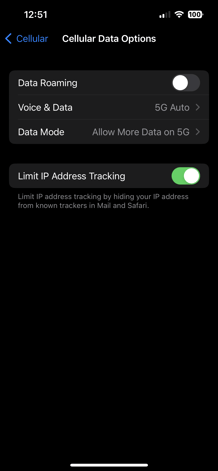
You'll need to turn roaming on, before you travel to use the Unreal Mobile roaming services. On iOS, go to **Settings** \> **Cellular** \> **Cellular** **Data** **Options** \> **Enable** **Data** **Roaming**.
#### Enable roaming on Android
You'll need to turn roaming on, before you travel to use the Unreal Mobile roaming services. On Android, go to **Settings** \> **Connections** \> **Mobile** **Networks**\> **Enable** **Roaming**.

- [What's New](https://help.unrealmobile.com/whats-new?hsLang=en#main-content)
- [📢 Get up to speed](https://help.unrealmobile.com/whats-new?hsLang=en#get-up-to-speed)
- [Device Support](https://help.unrealmobile.com/device-support?hsLang=en#main-content)
- [🔧 Troubleshoot](https://help.unrealmobile.com/device-support?hsLang=en#troubleshoot)
- [Account Management](https://help.unrealmobile.com/account-management?hsLang=en#main-content)
- [🗄️ The account portal](https://help.unrealmobile.com/account-management?hsLang=en#%EF%B8%8F-the-account-portal)
- [Orders and Payments](https://help.unrealmobile.com/orders-and-payments?hsLang=en#main-content)
- [💸 The money stuff](https://help.unrealmobile.com/orders-and-payments?hsLang=en#the-money-stuff)
- [Plans and Services](https://help.unrealmobile.com/plans-and-services?hsLang=en#main-content)
- [💬 Your service](https://help.unrealmobile.com/plans-and-services?hsLang=en#your-service)
- [About Unreal Mobile](https://help.unrealmobile.com/about-unreal-mobile?hsLang=en#main-content)
- [📚 What we're about](https://help.unrealmobile.com/about-unreal-mobile?hsLang=en#what-were-about)
[](https://www.unrealmobile.com)
Copyright © 2026, RedPocket Mobile